A Pomodoro Timer With Lofi Music on a Mac: What the YouTube Version Can't Do
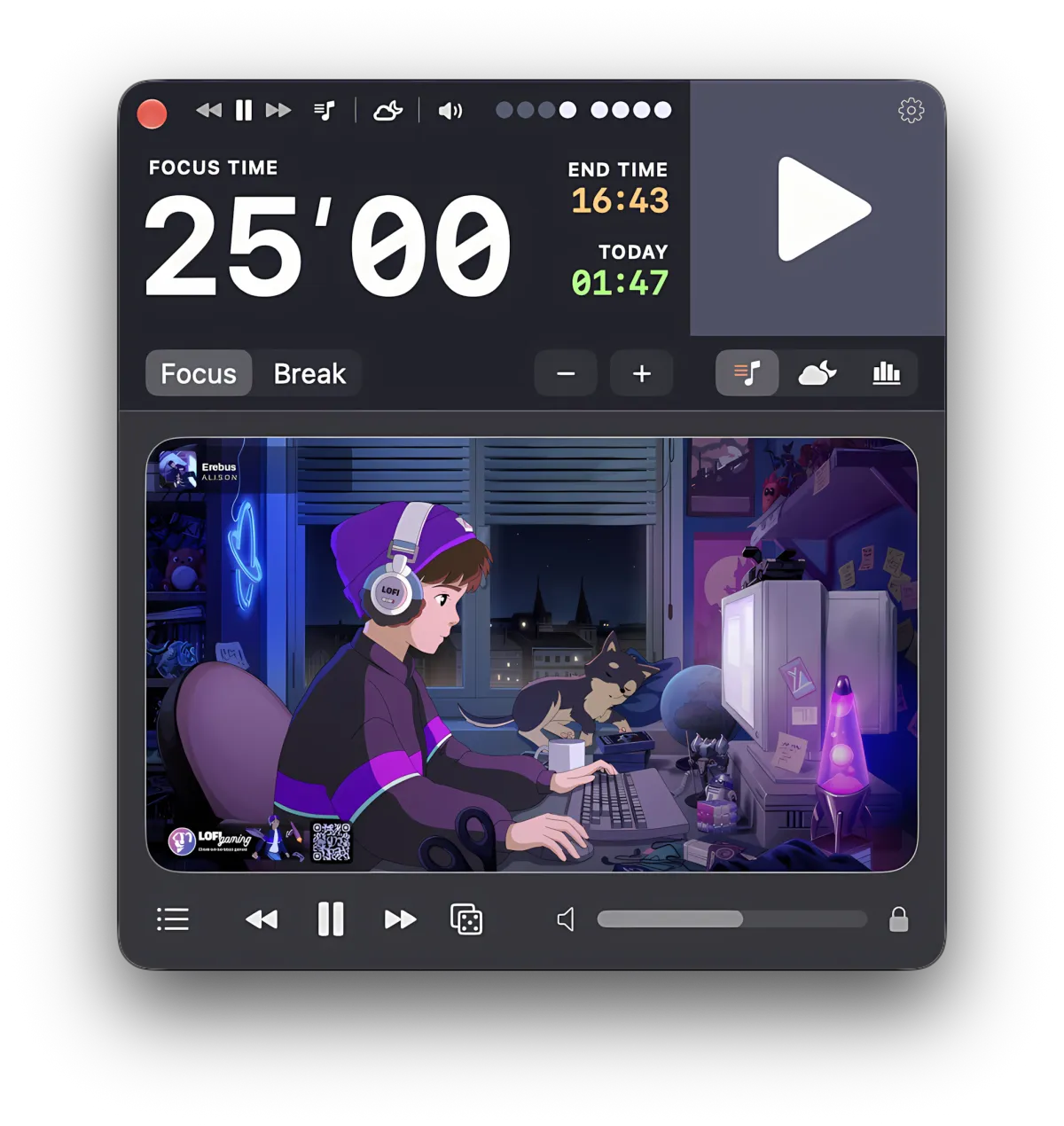
You want a pomodoro timer with lofi music, on a Mac, in one window. The search gives you two kinds of result: YouTube videos with a countdown drawn over a looping animation, and App Store listings for timers that run on iPhone, iPad, and Mac alike. Neither is wrong, but neither is the thing you typed.
The video has the music but a timer you cannot touch. The apps have a timer, but some of them, on a Mac, are iPad apps in a window. What you were picturing is a timer whose music starts when you start, stops when you stop, and lives in the window you are working next to.
Focusito puts a lofi player inside the pomodoro timer, so once you turn on follow-the-timer, the music follows the session instead of the other way round. The page below is the problem itself: what a lofi video actually is, what the App Store results actually are, the free way to do this on a Mac, and what changes when the player and the timer share a window.
A lofi pomodoro video is a recording, so its intervals cannot bend. The countdown on it is part of the picture. Pause the music and the timer stops; want longer sessions and you need a different video.
Some lofi timers in the Mac App Store ship a Mac version, and some are iPad apps running on a Mac. The store page tells you which before you install anything.
The free Mac answer is a timer you control plus the music in its own window. The paid answer is a timer that can control the music. Both are below.

A lofi video can only play the session its uploader recorded. Focusito plays lofi inside the timer window: you set the focus and break lengths, press start, and once you turn on follow-the-timer, the station you last played starts with the session, pauses when you pause, and goes quiet for the break. Twenty stations ship with the app, and any YouTube link you paste becomes another one.
The player takes YouTube links only, not Spotify, Apple Music, or a file on your disk, and it needs a network connection; what plays, and what interrupts it, is up to YouTube. After the free trial one station stays free, and the rest of the playlist is part of the one-time purchase.
A lofi pomodoro video is a timer you cannot adjust
Type “lofi pomodoro timer” into YouTube and the suggestions finish the sentence for you: “50/10”, “25/5”, “lofi girl pomodoro timer”, “lofi jazz”. Each of those is a video, usually two to three hours long, with a countdown drawn onto the picture and a set of work-and-break segments the uploader chose when they rendered it.
That is the whole mechanism, and it explains every limit at once. The countdown is pixels, not a clock. The intervals are whatever the file contains, so a 25/5 video is 25/5 forever and a 50/10 session is a different upload. Pausing the music pauses the timer, because they are one stream. And anything YouTube plays partway through lands inside your work block, since the video has no idea where your block is.
None of this makes the format bad. For a fixed routine, where every session is the same length and you do not pause, a two-hour video is a perfectly good timer and the music is free. It stops being good the moment you want the timer to bend: a session cut short, a break skipped, a different length tomorrow.
Check it yourself: open any of those videos and drag the scrubber forward a minute. The countdown jumps with it. A timer that can be scrubbed is a recording of a timer.
The free way on a Mac: a timer you own, and the music in its own window
Before any app, this is what a Mac already does.
For the timer, the Clock app that ships with macOS has a Timers view, and Apple notes that a timer keeps running when you switch to another app or your Mac goes to sleep. If you would rather not open an app at all, Terminal does it in one line:
sleep 1500; say "time"Twenty-five minutes, then your Mac says the word out loud. Change the number for a different length; 3000 is fifty minutes. Press ⌃C in that Terminal window to cancel.
For the music, the fix for “a tab I keep losing” is a window that is not a tab. Open the lofi stream or site in Safari, then choose File ▸ Add to Dock. Safari turns the page into a web app: its own icon in the Dock, its own window, no tab bar, and it stays put when you close the browser. Apple documents it as Use Safari web apps on Mac, and it needs macOS 14 or newer.
Check it yourself: after Add to Dock, press ⌘Tab. The web app appears in the switcher as its own entry, separate from Safari. That is what makes it findable when you have forty tabs open elsewhere.
What this free path does not do is keep the two in step. Clock’s “When timer ends” menu has a Stop Playing option, so the music can stop when the timer runs out, but nothing starts it again for the next block, and pausing the timer does not pause the music. That gap is the entire reason the next two sections exist.
Some lofi timers in the Mac App Store are iPad apps
Search the Mac App Store for a lofi pomodoro timer and you get real results with real downloads. On 8 October 2026 the first ones that came up for these searches were Lofi Bear: Pomodoro Timer, CafeLofi: Focus & Calm, and Stillroom FM: Lofi Focus Timer. All three are one listing for iPhone, iPad, and Mac, with a Mac version that has its own macOS requirement. Among the store’s suggestions on Lofi Bear’s page sits Lofumi: LoFi Pomodoro Timer, which is an iPad app running on the Mac.
You can see the difference on the store page without installing anything. An iPhone or iPad app offered on the Mac carries Apple’s line “Designed for iPad. Not verified for macOS.” (or “Designed for iPhone”), and the devices it lists are iPad and iPhone only. That means the app was submitted for iOS and is offered on Apple silicon Macs as it is. Whether anything reaches the Mac’s menu bar, which is where a countdown on a Mac normally lives, is up to each app, because an iPad has no menu bar to design for.
Check it yourself, on the store page itself. Scroll down to Compatibility and read the Mac line. On 8 October 2026 the four apps read like this:
| App | Devices listed | Mac line under Compatibility |
|---|---|---|
| Lofi Bear: Pomodoro Timer | Mac, iPad, iPhone | Requires macOS 14.2 or later. |
| CafeLofi: Focus & Calm | Mac, iPad, iPhone | Requires macOS 10.15 or later. |
| Stillroom FM: Lofi Focus Timer | Mac, iPad, iPhone | Requires macOS 15.6 or later. |
| Lofumi: LoFi Pomodoro Timer | iPad, iPhone | Requires macOS 13.0 or later and a Mac with Apple M1 chip or later. |
The M1 clause is the tell: it marks an iPhone or iPad app running on the Mac, and it comes with the “Designed for” label. A plain macOS version means the developer ships a Mac version. The check takes ten seconds and settles the question for any app on the store, lofi or not.
None of this is a complaint about those apps. They are the right tool for a different task: the same timer on your phone, your tablet, and your Mac. If what you want is a timer that sits beside your work on a Mac, the Mac line under Compatibility is the first thing to read.
lofi.co moved to Discord
Some of the people on this page typed “lofi.co alternative” to get here, so this deserves its own paragraph. lofi.co was a lofi music site that lived in a browser tab. On 8 October 2026 the site served one line, “A brand new lofi experience, now available on Discord”, and a button that leads to Discord. No player, no timer.
If what you liked was the window, Safari’s Add to Dock above gives any lofi stream a window of its own. If what you wanted was a timer and the music in one place, that is the next section, and the background sounds a Mac can make on its own are a page of their own.
What Focusito does instead
Everything above keeps the timer and the music apart, and you are the thing that connects them. Focusito puts them in one window and can let the timer do the connecting.
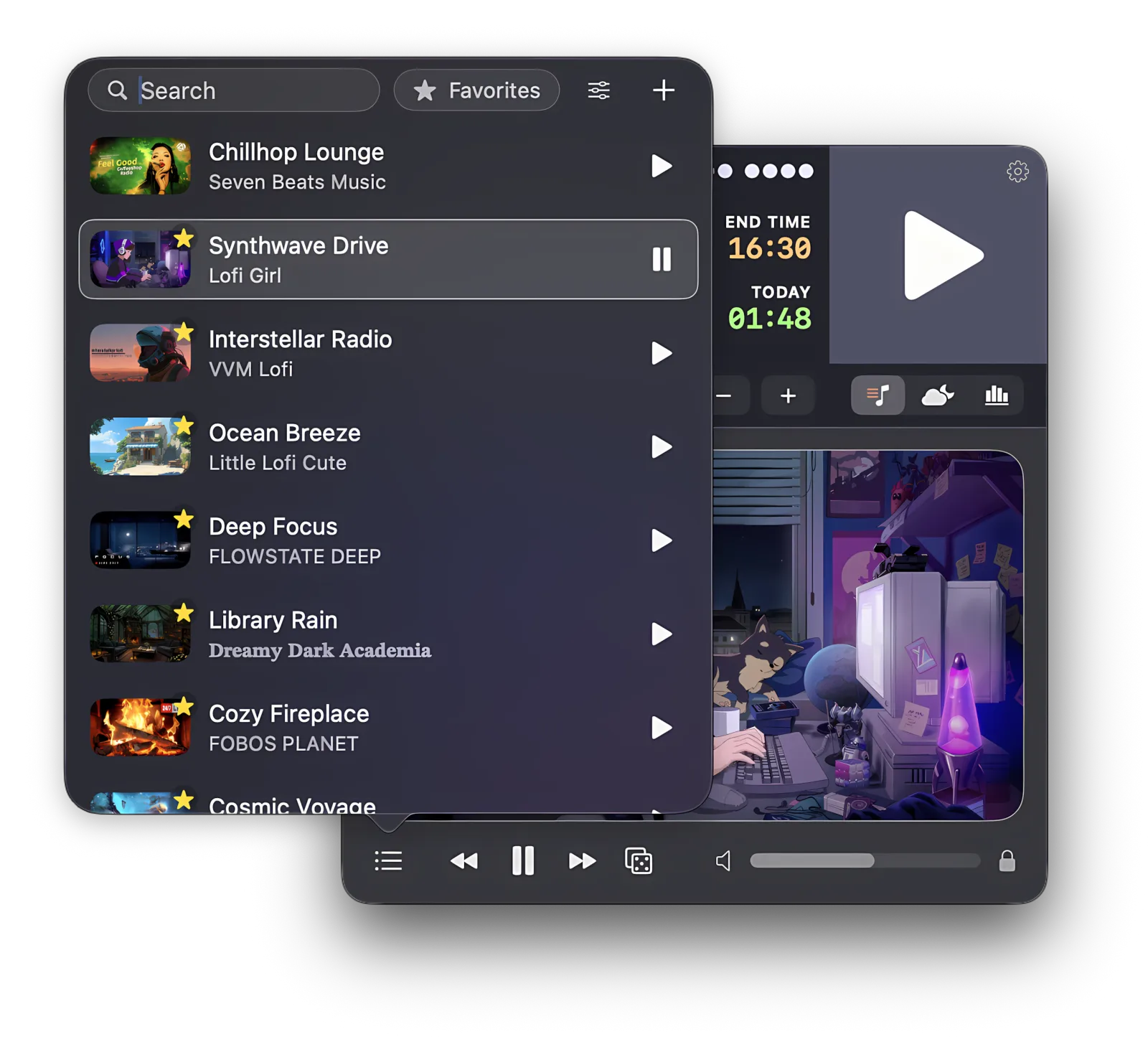
You pick a focus length and a break length, choose a station, and press start. Once you turn on follow-the-timer in the sound settings, the station you last played starts with the session, pauses when you pause, and resumes when you do. When the break begins, the music goes quiet, so you hear the change of mode instead of watching for it, and it comes back when the next focus block starts. The window is the window; there is no tab to lose.
The playlist is yours. Twenty stations ship with the app, from a lofi hip-hop stream to a jazz café to a few game soundtracks, and any YouTube link you paste becomes another one: a live “study with me” stream, a two-hour rain video, a lecture. Your Mac’s media keys play and pause it, and it shows up in the Now Playing panel like any other player, so you never have to find the window to stop the music.
If you do want the mechanical version: the player is a YouTube player embedded in the timer window. It accepts links from youtube.com, youtu.be, and music.youtube.com, including the /watch, /live/, /shorts/, and /embed/ forms, and nothing from any other site. Nothing is created until the first time you press play; after ten minutes of silence the player is released and comes back on the next play. Focus and break run from 5 to 60 minutes in steps of 5, and 50/10 against 25/5 is a choice you make in the timer rather than a different video. With follow-the-timer off, the player is an ordinary player: it plays and pauses only when you tell it to, and the timer never touches it. With it on, the break silence covers both the station and the background sounds, and that silence is on unless you turn it off.
The limit, stated once more: the player takes YouTube links only, and it needs a network connection. There is no Spotify or Apple Music source, no local files, and what YouTube does with a video, including what it plays between videos, happens inside Focusito exactly as it would in a browser. After the free trial, one station, Cozy Fireplace, keeps playing; the rest of the playlist is part of the paid unlock.
Common questions
Can I use a lofi pomodoro video on YouTube as my timer on a Mac?
Yes, and for a fixed routine it works. The catch is that the video is a recording: the countdown drawn on it and the music are one stream, so the intervals are whatever the uploader chose, pausing the music pauses the timer, and anything YouTube plays partway through lands inside your work block. If you want 50 and 10 instead of 25 and 5, you need a different video, not a setting.
Is there a lofi pomodoro timer app made for the Mac?
Some of the lofi timers in the Mac App Store ship a Mac version, and some are iPad apps running on the Mac. On 8 October 2026, Lofi Bear, CafeLofi, and Stillroom FM each listed a Mac version with its own macOS requirement, while Lofumi carried Apple's "Designed for iPad. Not verified for macOS." line. Focusito is a native Mac app with the lofi player inside the timer window.
How do I tell whether a Mac App Store app is really an iPhone or iPad app?
Look at its store page. An iPhone or iPad app offered on the Mac carries Apple's "Designed for iPhone" or "Designed for iPad" line, usually followed by "Not verified for macOS", and the Mac line under Compatibility asks for a Mac with an Apple M1 chip or later. An app with its own Mac version lists only a macOS version there.
What happened to lofi.co?
The website is gone. On 8 October 2026, lofi.co served a single line, "A brand new lofi experience, now available on Discord", and a button that leads to Discord: no player, no timer. Whatever lofi.co offers now lives on Discord, not on a web page. If you want a window with music and a timer on a Mac, the two free routes below replace it.
Can Focusito play Spotify or Apple Music during a pomodoro?
No. Focusito's player takes YouTube links only: a station in the playlist is a YouTube video or live stream, and the app needs a network connection to play it. There is no Spotify, Apple Music, or local-file source inside the timer. The starter playlist ships with twenty stations, and any YouTube link you paste becomes another one. After the free trial, one of those stations stays free; the full playlist is part of the paid unlock.